---
name: "up.log"
area: "API"
kind: "module"
parent: "API reference"
url: "https://unpoly.com/api/up.log"
---
# `up.log`
Features to log Unpoly's activity to the browser console.
By default only errors are logged. Call [`up.log.enable()`](https://unpoly.com/api/up.log.enable.md) to turn on debug logging and [`up.log.disable()`](https://unpoly.com/api/up.log.disable.md) to turn it off again. [`up.log.config`](https://unpoly.com/api/up.log.config.md) adjusts the output, like the banner and CSS formatting.
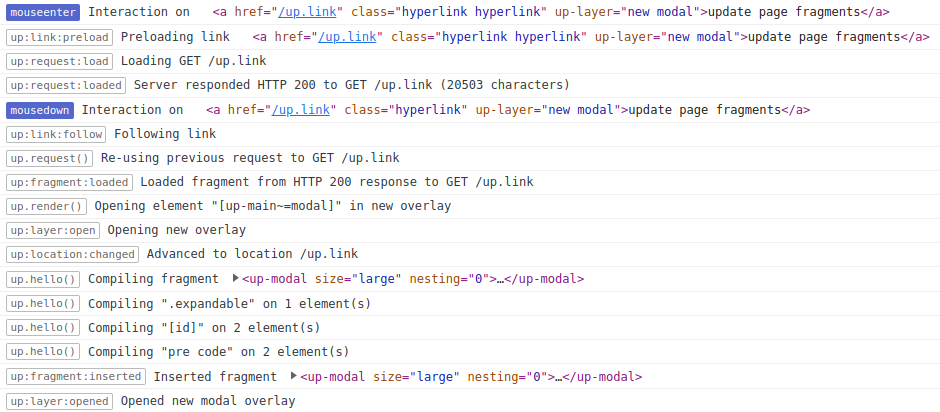
The log of a user hovering over a link and then clicking it. The link opens a modal overlay. Each line starts with a badge that names the event or function that logged it, followed by a message. Hovering (`mouseenter`) preloads the link: [`up:link:preload`](https://unpoly.com/api/up:link:preload.md), [`up:request:load`](https://unpoly.com/api/up:request:load.md), [`up:request:loaded`](https://unpoly.com/api/up:request:loaded.md). Clicking (`mousedown`) follows the link and re-uses the preloaded request. The next lines show the fragment being loaded, a new overlay opening, the location changing, compilers running on the new fragment and, last, [`up:layer:opened`](https://unpoly.com/api/up:layer:opened.md).
---
## Features {#features}
- ### [up.log.config](https://unpoly.com/api/up.log.config.md) (Configuration object)
Configures the logging output to the developer console.
- ### [up.log.disable()](https://unpoly.com/api/up.log.disable.md) (JavaScript function)
Stops printing debugging information to the developer console.
- ### [up.log.enable()](https://unpoly.com/api/up.log.enable.md) (JavaScript function)
Starts printing debugging information to the developer console.