---
area: "Changes"
parent: "Changes"
url: "https://unpoly.com/changes/upgrading"
---
# Upgrading Unpoly
New Unpoly releases will occasionally rename or remove an existing function, event or HTML attribute. To assist with upgrading, `unpoly-migrate.js` polyfills changed APIs.
## How it works {#how-it-works}
After upgrading Unpoly, add `unpoly-migrate.js` to your build. When your application calls an old API, a polyfill will forward the call to the new version automatically. A deprecation notice will be logged to your browser console:
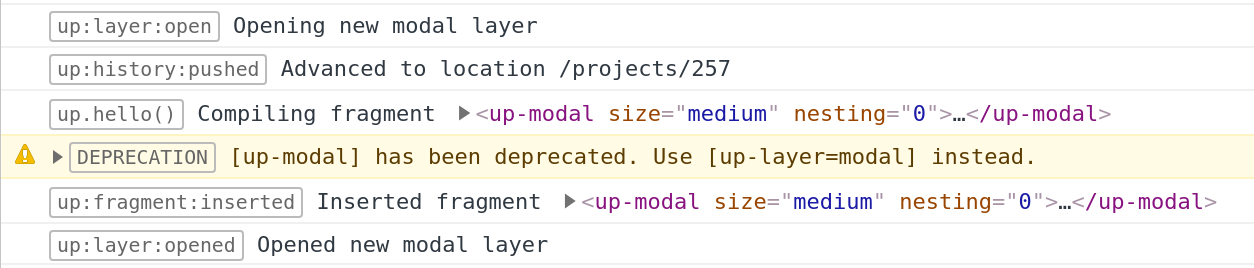
You can now upgrade deprecated call sites by following the log. Your application will remain functional during the whole process.
> Tip
>
> We recommend to temporarily load `unpoly-migrate.js` for every upgrade, even for minor version bumps. Changes handled by `unpoly-migrate.js` are not considered breaking changes.
## Recommended upgrade workflow {#workflow}
We recommend these steps for every upgrade, including minor version bumps. They work the same whether a person or a coding agent does the upgrade.
> Tip
>
> Coding agents can upgrade Unpoly for you. Give your agent the [Unpoly skill](https://unpoly.com/learn/skill.md). It contains this guide and the release notes of every version, so your agent has everything it needs.
1. **Find the version you're on.** Check `unpoly` in your `package.json`, `unpoly-rails` in your `Gemfile.lock`, the version in your CDN URL, or run `up.version` in your browser console.
2. **Read the release notes of every version after yours,** up to the version you're upgrading to, in the [list of all releases](https://unpoly.com/changes.md). Changes marked with 🧩 are polyfilled by `unpoly-migrate.js`, which logs where you use the old API. Changes marked with ⚠️ are not polyfilled, but rare or minor. Changes marked with ❌ are not polyfilled, and you should check your code in any case. Unmarked changes may still affect your app, so read every entry.
3. **Upgrade Unpoly and load the polyfills** as described in [Installing the polyfills](#installation). If you use a [server integration](https://unpoly.com/learn/protocol-implementations.md) like `unpoly-rails`, upgrade it to its latest version too. Its version number doesn't need to match Unpoly's.
4. **Fix every deprecation warning.** Use your app and run its tests. Every call to an old API logs an error that names the new API. With good test coverage, you can [let these errors fail your tests](#with-tests).
5. **Remove `unpoly-migrate.js`** once no warnings are left, or [keep it permanently](#permanent).
After the upgrade, look through the release notes of the versions you skipped for new features. Some of your own compilers may now have a built-in replacement, like [`[up-defer]`](https://unpoly.com/api/up-defer.md) for lazy loading or [`[up-poll]`](https://unpoly.com/api/up-poll.md) for polling. Do this in a separate change from the upgrade itself.
### Installing the polyfills {#installation}
`unpoly-migrate.js` comes included with Unpoly:
| Development | Production | |
| --- | --- | --- |
| [`unpoly-migrate.js`](https://cdn.jsdelivr.net/npm/unpoly@3.15.0/unpoly-migrate.js) | [`unpoly-migrate.min.js`](https://cdn.jsdelivr.net/npm/unpoly@3.15.0/unpoly-migrate.min.js) | 10.0 KB gzipped |
Load `unpoly-migrate.js` _after_ Unpoly, but _before_ your own code:
```
```
If you're using [Unpoly from npm](https://unpoly.com/learn/install.md#npm), import `unpoly-migrate.js` _after_ Unpoly, but _before_ your own code:
```
import 'unpoly/unpoly.js'
import 'unpoly/unpoly-migrate.js'
import './your-scripts.js'
```
### Upgrading with automated tests {#with-tests}
`unpoly-migrate.js` logs every call to a deprecated API to the browser's error console. If your end-to-end tests fail when the browser console shows an error, you can find the code that needs to be upgraded by following test failures. Most test runners can do this, e.g. with Playwright's `page.on('console')` or the browser logs in Selenium.
To make the messages easier to read in your test logs, you can turn off their formatting:
```
up.log.config.format = false // log unformatted text for easier extraction
```
> Note
>
> Before Unpoly 3.15, `unpoly-migrate.js` logged warnings. To log errors with an older version, set `up.migrate.config.logLevel = 'error'`.
## Keeping the polyfills permanently {#permanent}
If you prefer to upgrade at your own pace, it is possible to keep `unpoly-migrate.js` loaded permanently. This will add 10.0 KB (gzipped) to your production build.
You can remove the deprecation messages from the browser log like so:
```
up.migrate.config.logLevel = 'none'
```
In an ES module bundle, set this in a module that you import right after `unpoly-migrate.js`. Imports run before other code in the same file, so the setting would otherwise come too late for deprecated configuration in your imported modules.
> Note
>
> While we have traditionally supported old APIs for years, polyfills may be dropped from `unpoly-migrate.js` in any major version.
## Covered functionality {#coverage}
### Removed functions are polyfilled
If a function was removed without replacement, `unpoly-migrate.js` will provide a polyfill.
E.g. Unpoly no longer supports `up.util.times()`, but the function is re-added by `unpoly-migrate.js`.
### Renamed HTML attributes are aliased
E.g. `` will translate to ``
### Renamed functions are aliased
Calls to deprecated functions will be forwarded if there is an equivalent function in the current version.
E.g. `up.modal.close()` will call `up.layer.dismiss()`.
### Renamed options are aliased
Usage of deprecated options will be rewritten if there is an equivalent option in the current version.
E.g. `{ reveal: false }` will be renamed to `{ scroll: false }`.
### Renamed events are aliased
E.g. `up.on('up:proxy:load')` will bind to `up:request:load`.
> Important
>
> Event aliases are only used when registering listeners with [`up.on()`](https://unpoly.com/api/up.on.md), but not with the native `Element#addEventListener()`.
### Renamed namespaces are aliased
Usage of deprecated namespaces will be rewritten if there is an equivalent namespace in the current version.
E.g. `up.proxy.config` will return `up.network.config`.