---
area: "Learn"
parent: "Loading state chapter"
url: "https://unpoly.com/learn/progress-bar"
---
# Progress bar
When a request takes longer than 400 ms, Unpoly shows a thin progress bar at the top edge of the screen. This mimics the loading indicator that browsers show during full page loads.
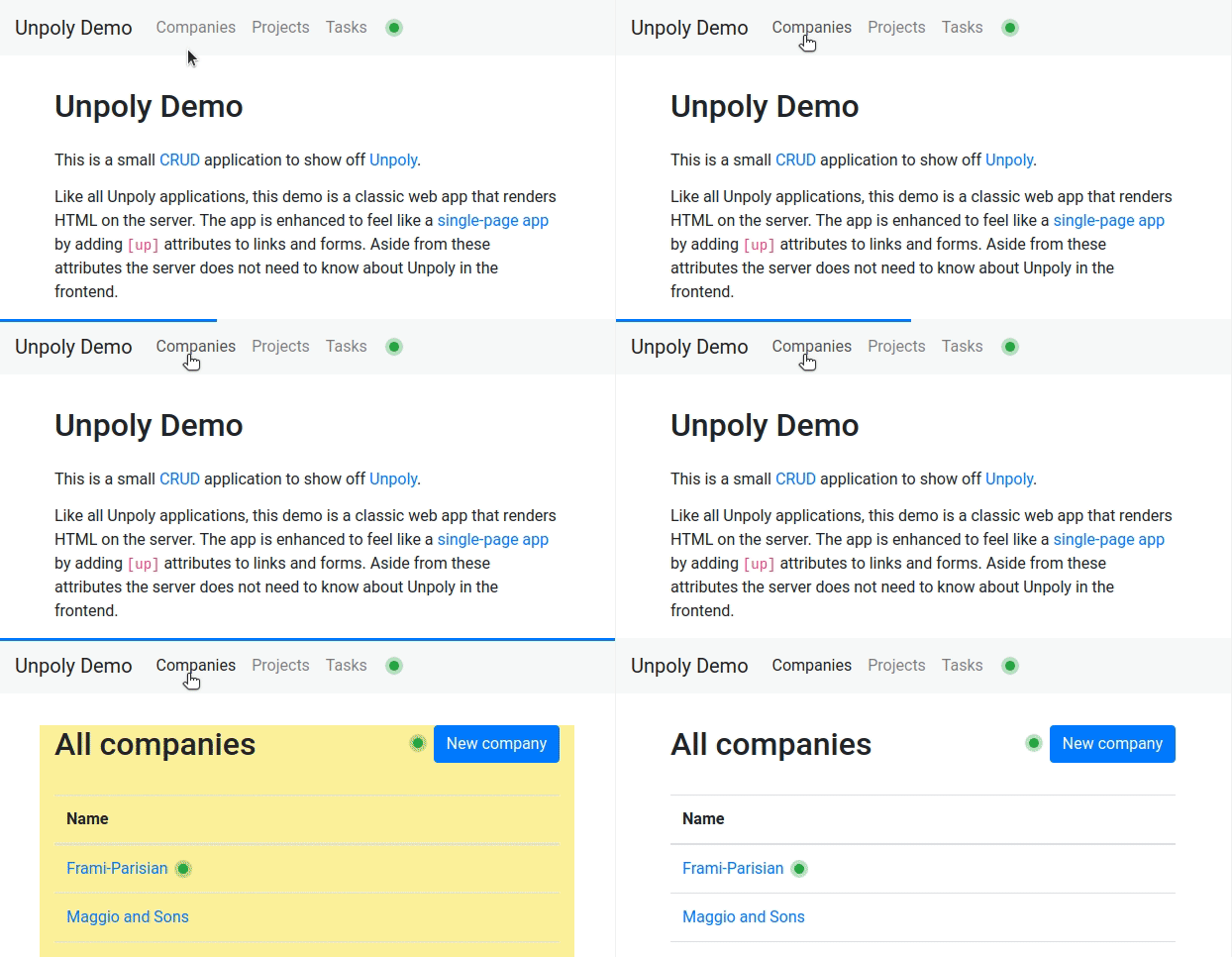
The user clicks a link in the navigation bar of a demo app. While the next page is loading, a blue bar grows from left to right along the top edge of the screen. When the new page appears, the bar is gone.
The progress bar requires no setup. You can [style it](#styling), [control when it appears](#timing), [disable it](#disabling) or replace it with a [custom loading indicator](#custom-implementation).
The progress bar is a global indicator and does not point at the fragment being updated. To show loading state within a fragment, see [Loading state](https://unpoly.com/learn/loading-state.md).
## Styling the progress bar {#styling}
The progress bar is implemented as a single `` element. Unpoly automatically inserts the element when requests are [late](https://unpoly.com/api/up:network:late.md), and removes it when they have [recovered](https://unpoly.com/api/up:network:recover.md).
By default the bar is 3 pixels high and blue. You may style the element using CSS:
```css
up-progress-bar {
height: 5px;
background-color: red;
}
```
## Controlling when the progress bar appears {#timing}
Unpoly shows the progress bar when a request takes longer to respond than [`up.network.config.lateDelay`](https://unpoly.com/api/up.network.config.md#config.lateDelay). The default is 400 milliseconds:
```js
up.network.config.lateDelay = 1000
```
You may override this per request by setting an [`[up-late-delay]`](https://unpoly.com/api/up-follow.md#up-late-delay) attribute or passing a [`{ lateDelay }`](https://unpoly.com/api/up.request.md#options.lateDelay) option. Passing `{ lateDelay: false }` never shows a progress bar for that request:
```html
Generate report
```
Requests that are loading in the background never show the progress bar. See [Background requests](https://unpoly.com/learn/background-requests.md).
## Disabling the progress bar {#disabling}
The progress bar can be disabled entirely:
```js
up.network.config.progressBar = false
```
## Custom loading indicators {#custom-implementation}
If you don't like the default progress bar, you can observe the [`up:network:late`](https://unpoly.com/api/up:network:late.md) and [`up:network:recover`](https://unpoly.com/api/up:network:recover.md) events to implement a custom loading indicator that appears during long-running requests.
To build a custom loading indicator, place an element like this in your application layout:
```html
Please wait!
```
Now add a [compiler](https://unpoly.com/learn/enhancing-elements.md) that hides the `` element while there are no long-running requests:
```js
// Disable the default progress bar
up.network.config.progressBar = false
up.compiler('loading-indicator', function(indicator) {
function show() { up.element.show(indicator) }
function hide() { up.element.hide(indicator) }
hide()
return [
up.on('up:network:late', show),
up.on('up:network:recover', hide)
]
})
```
The compiler returns the functions that unbind the event listeners, so the listeners are removed when the indicator element is [destroyed](https://unpoly.com/learn/enhancing-elements.md#destructor).