
Learn Closing overlays
An overlay closes when the user is done with it. The user can dismiss it with the Escape key
or the × button, and the overlay's own content can close it from a button, a link, a form,
JavaScript or a server response.
When it closes, the overlay can pass a result value back to the layer that opened it,
so the original screen can continue where the user left off.
Accepting and dismissing
Unpoly distinguishes two intents when an overlay closes:
- Accepting an overlay: the overlay closes with a positive outcome. The user confirmed with OK, picked a value, or created a record. An overlay can be accepted with a value, but doesn't need one.
-
Dismissing an overlay: the overlay closes with a negative outcome, or none at all. The user cancelled,
or simply closed it with the
×button, theEscapekey or a click on the backdrop.
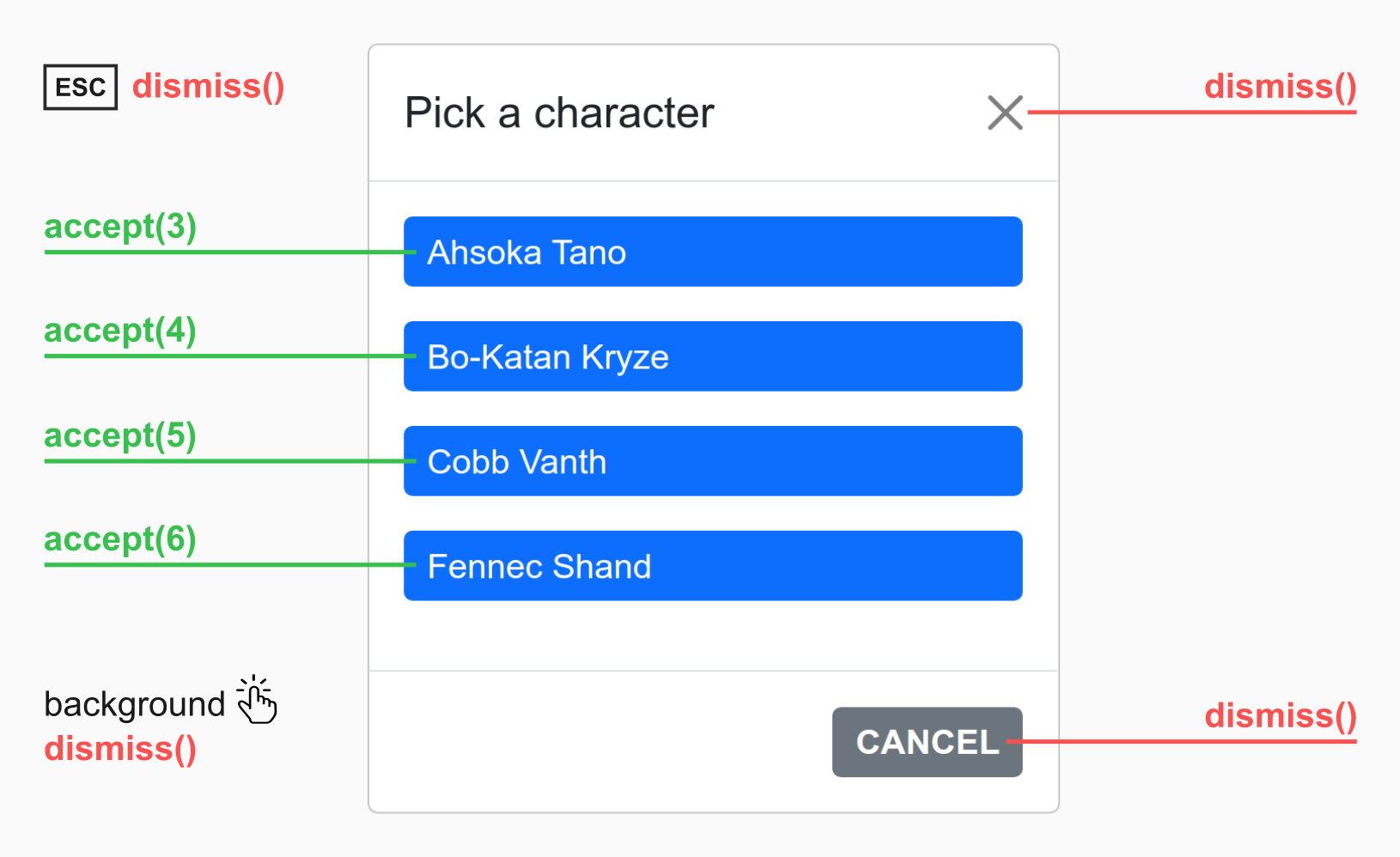
A modal overlay asks the user to "Pick a character" from four buttons.
Each button accepts the overlay with a different value, labeled accept(3) to accept(6).
Pressing Escape, clicking the × button, clicking the Cancel button or clicking the backdrop
all dismiss the overlay, labeled dismiss().
Acceptance usually continues a larger interaction in the parent layer, like selecting a record that was just created. When you wait for a subtask to finish, you are interested in acceptance, but not in dismissal.
Some overlays never have a positive outcome to report. When the user only looks at an overlay,
or makes changes in it that are saved right away, like adding and removing items in a list,
there is nothing to confirm. Such an overlay is only ever dismissed.
To update the parent layer after it closes, react to its dismissal, e.g. with
[up-on-dismissed-reload].
There is no callback for an overlay that closed either way. To react to both intents, handle both.
When an overlay closes, overlays it has opened are closed with it, its pending requests are aborted, and focus returns to the link that opened it.
Result values
An overlay can close with a result value. The value is passed to the layer that opened the overlay, which can use it to continue its own interaction: select a new option, navigate to another screen, or reload a list. See Subinteractions: Working with result values for how the opener receives the value.
Acceptance values
When the user selects a value, creates a record or confirms an action, the overlay is accepted with that value. The sections below show how a button, a form, JavaScript or the server pass a value when closing.
In the opener's [up-on-accepted] attribute, the value is available as value:
<a href="/select-user"
  up-layer="new"
  up-on-accepted="console.log('Got user', value)"> <!-- mark: value -->
  Select user
</a>
Dismissal values
A dismissed overlay can pass a value too. When Unpoly's own
dismiss controls close an overlay,
they set the reason for dismissal as the value.
For instance, clicking the × button dismisses with the value ":button":
| User interaction | Dismissal value |
|---|---|
User presses the Escape key |
":key" |
| User clicks the backdrop ("light dismiss") | ":outside" |
User clicks on the × button in the overlay corner |
":button" |
An overlay that closes because a layer below it is updated is dismissed with ":peel".
You can provide your own dismissal value when closing an overlay with up.layer.dismiss() or [up-dismiss].
The opener receives the value in an { onDismissed } callback or [up-on-dismissed] attribute:
<a href="/select-user"
  up-layer="new"
  up-on-dismissed="console.log('Dismissed because of', value)"> <!-- mark: value -->
  Select user
</a>
Letting the opener decide
Instead of closing the overlay from its content, the link that opens it can define a close condition, like reaching a URL. The overlay then closes automatically when its task is done. We recommend close conditions over the explicit commands on this page, since the overlay content then does not need to know that it is running in an overlay. See Subinteractions: Close conditions.
Closing when a button is clicked
To close the current layer when a button is clicked, set an [up-accept] or [up-dismiss] attribute:
<button up-accept>Close overlay</button> <!-- mark: up-accept -->
To close with a result value, set the attribute to a relaxed JSON value:
<button up-accept="{ id: 5 }">Choose user #5</button> <!-- mark: { id: 5 } -->
Closing when a link is followed
When reusing a page within an overlay, you may want a link that closes the overlay, but navigates somewhere else when clicked on the root layer.
For this, set [up-accept] or [up-dismiss] on a hyperlink (<a>) with a fallback URL in its [href] attribute:
<a href="/list" up-accept>Finish</a> <!-- mark: href="/list" -->
Clicked in an overlay, the link accepts the overlay and the click event is prevented.
Clicked on the root layer, the link navigates to /list.
Closing when a form is submitted
To close an overlay when a form is submitted, set an [up-accept] or [up-dismiss] attribute on the <form> element.
The overlay closes immediately on submission, without a network request:
<form up-accept> <!-- mark: up-accept -->
  ...
</form>
Accessing the form params
The form's field values become the result value of the closed overlay.
For example, this form has two fields named foo and bar:
<form up-accept>
  <input name="foo" value="1"> <!-- mark: foo -->
  <input name="bar" value="2"> <!-- mark: bar -->
</form>
The params are exactly those a regular submission would send, so a
submit button with a [name] also contributes its value.
This lets the opener see which button was pressed:
<form up-accept>
  <button type="submit" name="commit" value="save">Save</button> <!-- mark: commit -->
  <button type="submit" name="commit" value="publish">Publish</button>
</form>
The values arrive as an up.Params object in the opener's { onAccepted } or { onDismissed } callback:
up.layer.open({
  url: '/form',
  onAccepted: ({ value }) => {
    console.log(value.get('foo')) // result: "1"
    console.log(value.get('bar')) // result: "2"
  }
})
Regular submission on the root layer
When a form with [up-accept] or [up-dismiss] is submitted within an overlay, the submit event
is prevented and no request is made.
When the same form is submitted on the root layer, there is no overlay to close.
The form is then submitted regularly, e.g. with a POST request.
This lets you reuse an existing form within an overlay.
Closing after the submission request
When the form should make its request before the overlay closes, do not set
an [up-accept] or [up-dismiss] attribute. Make a regular form that is handled by Unpoly instead:
<form up-submit> <!-- mark: up-submit -->
  ...
</form>
After the server has processed the request, it can close the overlay in several ways:
- Redirecting to a location that is a close condition
- Emitting an event that is a close condition
- Sending a response header that closes the overlay
Closing from JavaScript
When you cannot use a close condition, call up.layer.accept()
to accept the current layer:
up.layer.accept()
To accept with a result value, pass it as an argument:
up.layer.accept({ name: 'Anna', email: 'anna@domain.tld' })
To dismiss an overlay from JavaScript, use up.layer.dismiss() in the same fashion.
Closing from the server
When you cannot use a close condition,
the server can close the targeted overlay by sending an X-Up-Accept-Layer or X-Up-Dismiss-Layer response header.
The header value is the result value as relaxed JSON, or null for no value:
Content-Type: text/html
X-Up-Accept-Layer: { id: 123 }

<html>
  ...
</html>
With the unpoly-rails gem, you can produce these headers with up.layer.accept(value) or up.layer.dismiss(value).
Libraries for other backends offer similar helpers, or you can set the headers yourself.
The server can check whether a request targets an overlay by looking at the X-Up-Mode request header.
When an overlay closes in reaction to a server response, you can access the discarded response.
Keeping an overlay open
To keep an overlay open, prevent its up:layer:dismiss event.
Check the dismissal value to only ask when the user closes the overlay
with the Escape key, a backdrop click or the × button:
up.on('up:layer:dismiss', function(event) {
  let userClosed = [':key', ':outside', ':button'].includes(event.value) // mark: [':key', ':outside', ':button']
  if (userClosed && !confirm('Close this overlay?')) {
    event.preventDefault() // mark-line
  }
})
Without that check, the listener would also ask when the overlay closes because a link or form updated a parent layer, e.g. after a successful save. The overlay closes anyway in that case, so the question would only confuse the user.
To ask only when a form in the overlay has unsaved changes, see Preventing loss of unsaved changes.
To keep only one particular overlay open, set an [up-on-dismiss] attribute
on the opening link, or pass an { onDismiss } callback, and call event.preventDefault() in it.
Mind the tense: [up-on-dismiss] runs before the overlay closes,
[up-on-dismissed] (past tense) runs after it closed.
No listener can keep an overlay open when the user presses the Back button, since going back closes all overlays.
Closing by targeting a background layer
When a link or form in an overlay targets a background layer, the overlay is dismissed once the background layer is updated. This behavior is called peeling.
The form below uses an [up-layer] attribute to update the parent layer
after a successful submission:
<form method="post" action="/users" up-layer="parent"> <!-- mark: up-layer="parent" -->
  <input type="text" name="email">
  <button type="submit">Create user</button>
</form>
A successful submission dismisses the form's own overlay with a dismissal value of ":peel".
A listener cannot keep a peeled overlay open. By the time the overlay closes, the server has already processed the request.
Note
The form still updates its own layer when the server responds with an error code due to a validation error.
To update another layer in this case, set an[up-fail-layer]attribute.
Accepting peeled overlays
By default, peeled overlays are dismissed. To accept them instead, set an [up-peel="accept"] attribute
on the link or form that targets the background layer:
<form method="post" action="/users" up-layer="parent" up-peel="accept"> <!-- mark: up-peel="accept" -->
  ...
</form>
Discarded responses
When a server response closes an overlay, nothing from that response is rendered. This happens when the response matches a close condition, or when the server explicitly closes the overlay.
Using the discarded response
Sometimes you need the discarded response anyway, e.g. to render its content in another layer.
One way is an [up-hungry] element with an [up-if-layer=subtree] attribute in a parent layer.
Such an element is updated with the discarded response of a closing overlay.
For more control, read the response from the { response } property of the up:layer:accepted
and up:layer:dismissed events, and pass it to up.render().
See Subinteractions: Reloading on acceptance for an example that updates a list
without making another request.
The { response } property is set whenever a server response causes an overlay to close:
- When a server-sent event matches a close condition.
- When the new location matches a close condition.
- When the server explicitly closes an overlay with an HTTP header.
Rendering discarded notification flashes
Confirmation flashes in a discarded response would be lost as well.
An [up-flashes] element picks up flashes from a closing overlay and
renders them into the parent layer.
Close animation
To close with a different animation than the one configured for the overlay, pass an { animation }
option to up.layer.accept() or up.layer.dismiss(), or set an [up-animation] attribute on an
[up-accept] or [up-dismiss] element. See Customizing overlays: Open and close animations for the default animations.